Aurelia Voice
LiveReal-time AI voice intake that captures structured leads from after-hours calls.
view live projectI had been following the voice AI space, especially LiveKit, and wanted hands-on understanding instead of just reading about it. Aurelia Voice started as a technical learning exercise to push past frontend work and into real-time orchestration.
I picked a voice receptionist as the constraint because it forces you to combine customer interaction, structured data capture, real-time responsiveness, and workflow automation in a small but realistic system. The point was to ship something tangible that forced decisions on architecture, latency, prompt design, and deployment, not consume AI content passively.
This isn’t a startup pitch and Aurelia isn’t production infrastructure. It’s a working prototype that made me think through every layer of a modern voice AI stack.
Before the project felt useful, a short list of things had to feel believable in practice:
- 01 Responses fast enough to avoid awkward pauses.
- 02 Names and phone numbers captured reliably.
- 03 No dead-ends or awkward conversational loops.
- 04 Lead data writing cleanly into a structured system.
- 05 Operationally useful, not just technically impressive.
- 06 Architecture light enough to prototype quickly.
One call walks through a small loop. The caller speaks. LiveKit handles the bidirectional audio stream. Deepgram transcribes in real time. The OpenAI agent runs the intake conversation and decides what to ask next. OpenAI TTS speaks the response back. Once the conversation has captured the required fields, a row writes to Google Sheets.
Five layers, each chosen for one reason. Nothing custom-built that an existing tool already handles well.
LiveKit handles the parts of the audio loop that aren’t worth building from scratch: codec, network, reconnects. Deepgram and OpenAI carry the speech-to-LLM-to-speech loop. Google Sheets is the lightest possible structured output sink, and it lets a non-technical owner read the results immediately.
Render hosts the long-lived Python worker that holds the call session. Vercel hosts the static demo page and a small serverless function that issues guest tokens, so the demo is publicly accessible without exposing LiveKit credentials.
Conversation flow and prompting
Early prompt versions over-talked, repeated themselves, or interrupted awkwardly. I iterated on prompt structure to balance friendliness, brevity, information-gathering, and flow control. The agent needed to feel like a competent receptionist, not a script reader.
Capturing names and phone numbers
General conversation is one thing. Names and phone numbers are another. Background noise, speaking speed, accents, and filler words made structured intake inconsistent. I refined how the agent confirms and formats fields before writing them, so a misheard digit doesn’t silently land in the sheet.
Real-time coordination
Each piece (audio streaming, STT, LLM, TTS, tool execution) works fine alone. The hard part is making the interaction feel cohesive and responsive enough to resemble a believable receptionist. Latency budgets compound; a slow STT plus a slow LLM means two too-long pauses, not one.
Public deployment
A local prototype is very different from something a stranger can hit. Environment variables, guest-token issuance, deploy config, and debugging cloud-hosted workflows added their own layer. Getting the demo accessible without exposing LiveKit credentials is what forced the static-page-plus-serverless-function setup.
I tested the system through repeated self-testing and simulated intake calls: interruptions, unclear requests, fast speaking, off-topic questions, incomplete information.
The point wasn’t perfect conversational intelligence. It was validating whether the workflow felt operationally believable when a caller doesn’t behave perfectly. Most of the failure modes I cared about were the edges, not the happy path.
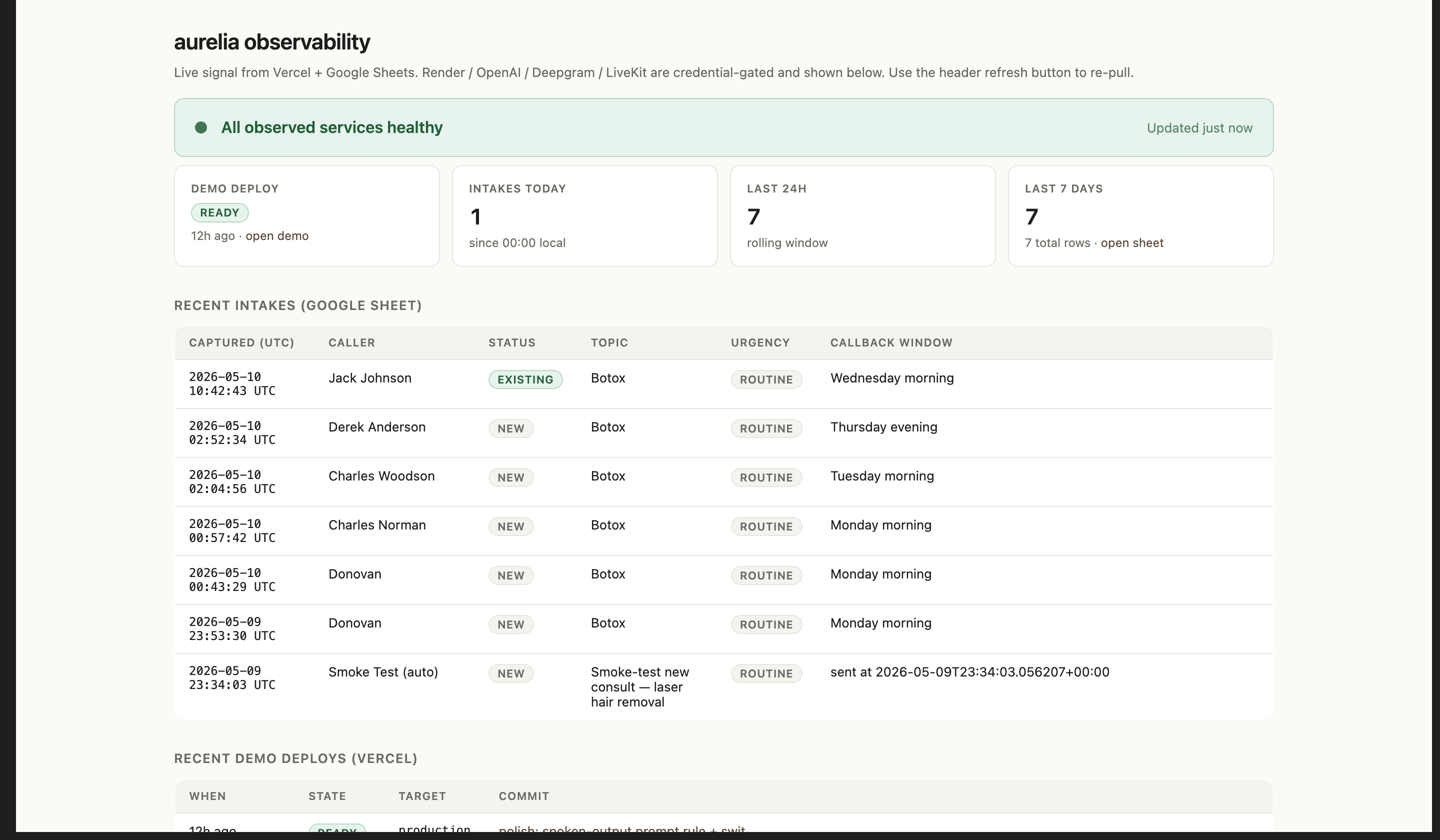
A working demo isn’t the same as a working system. After the prototype was deployed, I wanted to be able to walk up to it cold and answer two questions: is it running, and is the data going where it should.
I built a lightweight operations view that pulls live signal from Vercel (deploy state) and the Google Sheet (intake events). Render, OpenAI, Deepgram, and LiveKit are credential-gated services I check from the same surface. It’s not a SOC. It’s the minimum I’d want before assuming anything’s fine.
Every row in the intake table is a real call that made it through the full loop. That’s the difference between “the demo loaded” and “the system worked.”
If I kept building this, the priority would be moving from “captures a lead” to “closes a loop.” That means appointment scheduling on the way out, SMS follow-up after the call, and writing to a real CRM rather than a sheet.
The conversational layer also needs depth: memory across turns, fallback paths when the agent isn’t confident, and escalation to a human number when something is genuinely urgent.
On the operations side, the dashboard above gives me system-level visibility. The gap is per-call analytics: turn-level latency, ASR confidence per field, where conversations drop off. That’s where I’d invest next if real customers were on the line.